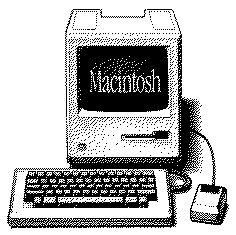
Apple
Image Writer II - "Snow White" Edition - 
Here you find
other Apple and Mac Collectors Items.
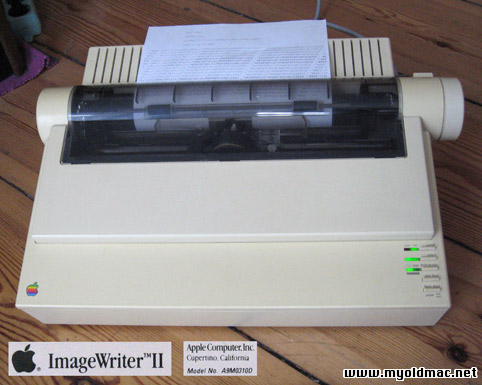
An Apple ImageWriter II "Snow White" tested - in working
order. Softly yellowed due to its age. A B/W ribbon
is inside the Printer, and produces still characters (selftest) - see the photos.
No Driver Disk, you can download
the ImageWriter drivers here, if you don´t
have them on a System 7.0 Disk. Comes with power supply cable. You can buy a suitable cable to connect
your Apple IIe to this Image Writer II here.
The mini circular-8 connector and cable, available
as a separate item, connects the ImageWriter II
to Apple CPUs. The Apple II, II Plus, and IIe
require a Super Serial Card or Grappler+ to connect with an
ImageWriter II. Here you can get original Image Writer II colour ribbons.
The ImageWriter II came in two models. The older and heavier model A9M0310 (white) or A9M0320 (gray) and the newer model G0010 (C0090LL/A or C009011/A). They both perform and look identical; however some case parts are not interchangeable. Both accept the same AppleTalk add-on card and the ribbons and print heads are the same. The ImageWriter II is compatible with every Macintosh with a serial printer port, going back to the original Macintosh. It is also compatible with every model in the Apple II line, the Lisa 2 (Macintosh XL), and even the very rare Apple III.
The ImageWriter was a main staple of printing
from the Macintosh for a long time. Classic Macs
need a classic printer to accompany them. With
an Apple ImageWriter printer attached to your
Macintosh, you can get printed copies of your
work. With most computers ( in1984) what you see
on the screen and what you get from the printer
look very different. With Macintosh, what you
see is what you get. MacWrite produced exactly
this, while Microsoft Word did not (it bent the
rules a bit). It's ideal for printing on continuous-feed
paper, such as payroll checks or preprinted forms.
The ImageWriter II color printing
feature requires an ImageWriter
II Color Ribbon and color-compatible software
(Canvas and SuperPaint for instance). When the
ImageWriter was introduced it cost $545, the ImageWriter
II was introduced at a cost of $595.
The ImageWriter II is designed to use track paper that is fed through a slit on the back. It has the ability to feed regular sheets of paper, but this requires a special feeder attachment called an ImageWriter II SheetFeeder. Regular paper can be used without the SheetFeeder, but must be feed in one at a time. The ImageWriter II can also be used to print labels and envelopes.
Although the ImageWriter II is no longer being
produced, millions of them were made and are still
a common sight in schools. It is not uncommon
to see an iMac equipped with ethernet operating
next to a classic Mac with an ImageWriter II.
Some ImageWriter IIs have been in continuous service
for 15 years. These machines were built to last
a very long time.
Specifications
* Resolution: 144 dots per inch
* Printing Speed: 5 page per minute (best mode)
* Fonts: Built-in character sets for English,
Italian, Danish, German, Swedish, French, and
Spanish
* Paper handling: Supports both cut sheet and
fanfold continuous (3 to 10 inches in width);
prints forms, labels, envelopes
* Interfaces: Direct connection--RS-422/RS-232
(serial); LocalTalk (requires ImageWriter II/LQ
LocalTalk Option); Quickdraw
* Dimensions (HWD) 5.0 by 17.0 by 12.0 inches
* Weight 15 lbs (6.8 Kilo)
* Recommended number of users: One to three
(with LocalTalk option)
o Capable of printing color documents (requires color
ribbon).
o Can be equipped with a cut-sheet feeder, which
holds as many as 100 single-sheet pages of cut-sheet
paper.
Key features
* Prints dot-matrix format, so its good for
drafts, and can handle mulitpart forms.
* Has tractor-feed feature, which allows it
to print on continuous feed paper.
* Prints in tow modes--draft mode and best mode.
* Can print on labels and envelopes.
* Is compatible with Apple II and Macintosh
computers.
* Qualifies for the EPA Energy Star rating as
an energy efficient product.
External links
Apple
Image Writer II "Snow White" Edition - 
Hier finden Sie weitere
Apple & Mac Raritäten zum Kauf.
Apple ImageWriter II (Farbdruck fähig mit
Farbband), getestet durch den Selbsttest. Kommt mit dem Stromkabel, ohne Treiber Disk, die Treiber sind auf der System
7.0 Disk, sie können die Treiber
aber auch bei apple.com downloaden. Es ist
ein S/W Druckband im Drucker das auch heute noch
funktioniert (siehe Photos). Man kann den Drucker auch mithilfe eines optionalen Kabels und einer Grappler+ Card an den Apple IIe anschließen.
Der ImageWriter II war für lange Zeit die
erste Wahl als Drucker für den Macintosh,
und klassische Mac´s brauchen einen klassischen
Drucker. Mit einem ImageWriter II am Macintosh
bekommen Sie gedruckte Kopien ihrer Arbeit. Mit
den meisten Druckern (von 1984) war das, was man
auf dem Bildschirm sah, recht unterschiedlich
zu dem was man aus dem Drucker bekam. Mit dem
Macintosh bekommt man was man sieht. MacWrite
erzeugt genaue Drucke, Microsoft Word tut das
nicht. Der ImageWriter II ist ein Tintenstrahldrucker
der gut in Klassenräumen, privat oder professionell
eingesetzt werden kann. Er ist ideal um mit Endlospapier
(perforiert) zu drucken, wie zB Auszahlungsbelege,
Rechnungen oder Listen. Um in Farbe zu drucken
benötigt man ein ImageWriter
II Color Ribbon und farbfähige Software,
zum Beispiel: Canvas and SuperPaint. Der ImageWriter
II wurde 1984 für 595 $ verkauft.
Weiter technische Details (in englisch)
Photos

Apple Macintosh Image Writer II - "Snow White" Edition softly yellowed due to age
Apple Macintosh Image Writer II - "Snow White" Farbe wie der Apple //c, leicht vergilbt

The ImageWriter II - dot-matrix printer well
suited for personal and professional use
Der ImageWriter II - ein Tintenstrahldrucker für
den privaten oder profi Bereich

A B/W ribbon is inside the printer, produces
still some characters, here the self test
Es ist ein S/W Band im Drucker, es produziert
heute noch Schrift, hier der Selbsttest

Some scratches on the coating, but nearly not to see
Hat ein paar Kratzer auf dem oberen Deckel, sind aber kaum zu sehen. |